If you’ve ever tried to make sense of Microsoft’s Dynamics product lineup, you’re not alone. Between rebrands, acquisitions, and evolving cloud strategies, even seasoned IT professionals can find themselves confused about what Dynamics actually is, how its components relate to each other, and what it means for their organization’s technology roadmap.
This guide is designed to cut through that confusion. Whether you’re evaluating Dynamics for the first time, managing an existing implementation, or planning a migration, understanding the ecosystem is the essential first step.
D365 Is Not One Product
The single most important thing to understand about Microsoft Dynamics 365 is this: it is not a single, unified product. It is a collection of separate product families that Microsoft has brought together under one brand umbrella.
When you look at D365 today, you’ll see a hub-and-spoke diagram showing Sales, Customer Service, Field Service, Commerce, HR, Finance, Supply Chain Management, and Project Operations all presented as modules of one coherent suite. The marketing suggests seamless integration across all of them. The reality is more nuanced.
D365 is actually made up of two distinct product lineages. The first comes from Microsoft’s CRM product, now called Dynamics 365 Customer Engagement (CE). This family includes D365 Sales, Customer Service, Field Service, and Customer Insights. These applications share a common backend (Power Platform and Dataverse) and are tightly integrated with each other.
The second lineage comes from Dynamics AX, Microsoft’s enterprise resource planning product. This family includes D365 Finance, Supply Chain Management, Commerce, HR, and Project Operations. These modules also share a common backend database and are tightly integrated with one another.
Here’s the key point: these two families, CE and Finance & Operations, are separate products with separate backends. They communicate through a technology called Dual Write, which has both strengths and real limitations. If your plans assume that D365 Sales and D365 Finance are natively integrated out of the box, you’ll need to plan for the integration work required to connect them.
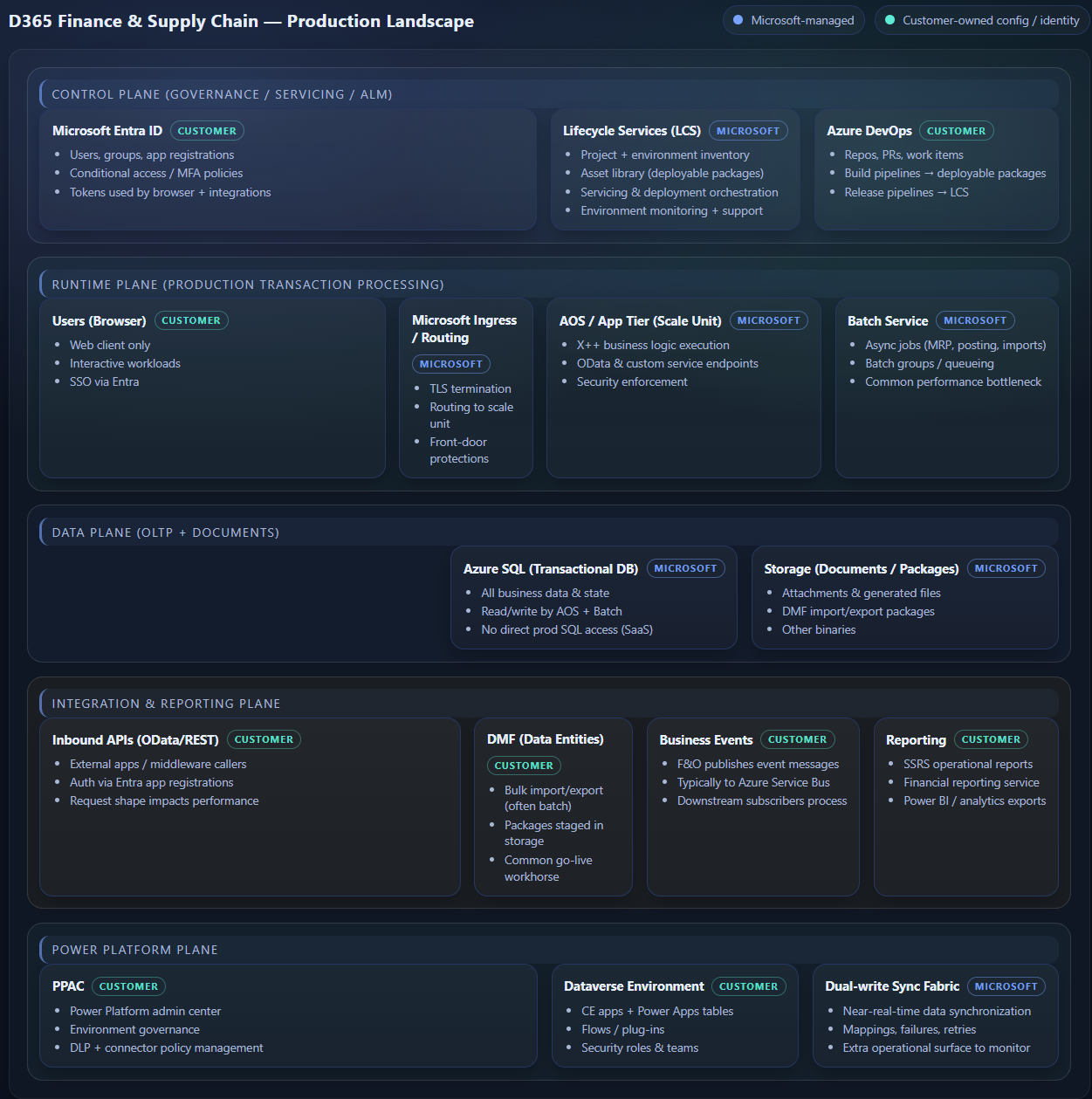
Then there are the other products that round out the picture. Business Central (the successor to Dynamics NAV) serves the small-to-mid-market, while Dynamics GP remains in maintenance mode (but Microsoft is encouraging new users to go to BC instead). These are separate products entirely, with their own databases, their own architectures, and their own partner ecosystems. The D365 brand ties them together in name, but the technical reality is more complex.
How We Got Here: A Brief History

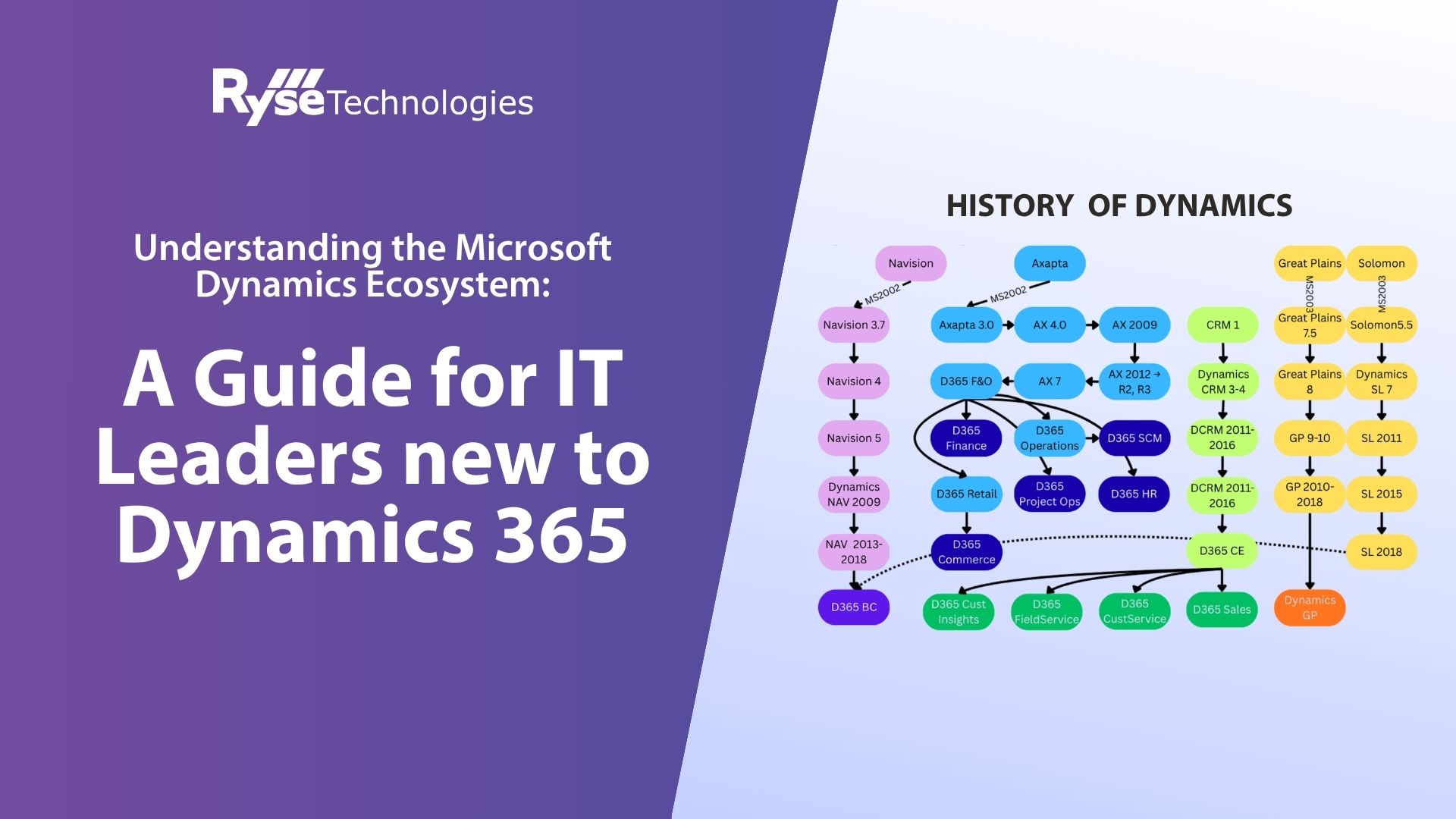
Understanding why the ecosystem looks this way requires a quick trip through history. In the early 2000s, Microsoft decided to enter the ERP market. Rather than building a product from scratch, they acquired products from four separate companies in rapid succession: Navision (which became Dynamics NAV, now Business Central), Great Plains (now Dynamics GP), Solomon (now Dynamics SL), and Axapta (which became Dynamics AX, now D365 Finance & Operations).
Each of these products came from a different vendor with a different architecture, different codebase, and different target market. Microsoft initially maintained all four product lines in parallel, which created the fragmented landscape we still see echoes of today.
Over time, Microsoft consolidated. Dynamics AX evolved through versions 3.0, 4.0, 2009, and 2012 before making the leap to the cloud as D365 Finance & Operations. Navision followed a similar path to become Business Central. Great Plains and Solomon continued as on-premises products, though GP is now in a maintenance-only phase. Meanwhile, Microsoft’s separate CRM product evolved into D365 Customer Engagement.
The result is that today’s D365 is less like a single ERP suite and more like a federation of products that Microsoft is gradually pulling closer together, but they aren’t there yet.
This history matters because it explains many of the integration challenges organizations face today. When a company wonders why their D365 Sales data doesn’t seamlessly flow into D365 Finance, the answer is that these products were built by different teams, on different codebases, acquired at different times. Microsoft is investing heavily in bringing them closer together, but the legacy of those separate origins still shapes the platform.
The Role of ISVs in the Ecosystem
One of the most important aspects of the Dynamics ecosystem is the role of Independent Software Vendors (ISVs). An ISV builds certified add-on applications that extend Dynamics to provide industry-specific or specialized functionality that Microsoft doesn’t offer out of the box.
ISV solutions range from lightweight add-ons that handle a specific function (like sales tax calculation or document management) to comprehensive vertical solutions that can modify a significant portion of the core product to serve a particular industry. For example, in the heavy equipment dealership space, an ISV solution might add equipment lifecycle management, specialized service management, parts and warranty tracking, and industry-specific workflows.
The key distinction is that ISV solutions extend D365, they don’t replace it. They upgrade alongside D365 and depend on Microsoft’s core platform. However, they are not supported directly by Microsoft. If something breaks, you’re working with your ISV partner, not Microsoft support.
This creates an important dynamic: your ISV partner often has more pull with Microsoft than you do as an individual customer. When there’s a platform issue that affects the ISV’s product, they can escalate in ways that direct customers typically cannot. Choosing the right ISV partner, and understanding how deeply their solution integrates with the core product, is one of the most consequential decisions in a Dynamics implementation.
It’s also worth understanding the difference between a lightweight ISV add-on and a deep vertical solution. A tax calculation tool like Avalara plugs in cleanly and can be swapped out relatively easily. A vertical ISV that touches your equipment management, service operations, and industry-specific workflows is a much deeper commitment. It’s closer to a co-dependency than a simple add-on. When evaluating ISV partners, consider how tightly coupled their solution is to your daily operations and what your contingency plan looks like if that partnership changes.
Licensing: What You Need to Know
Dynamics licensing has undergone significant changes, particularly with the move to D365. In the AX 2012 era, licensing was based on perpetual licenses with named users (Enterprise, Task, or Self-Service) and module-level configuration keys. You bought the software once and paid an annual enhancement plan, typically around 20% of the license cost.
D365 licensing is subscription-based and has recently seen substantial changes. The model now requires a minimum of 20 licenses to purchase. Each application (Finance, Supply Chain Management, Commerce, Project Operations, HR) is available as a full license or as an “attach” license at approximately $210 per user per month. There are also new Premium licenses (around $300/user/month) that include AI-powered tools, device licenses for kiosks and warehouse scanners ($85/month), Team Member licenses for light use like approvals and expense reports ($8/user/month), and Activity licenses for shop floor and warehouse operations ($50/user/month).
The licensing structure rewards organizations that use multiple D365 modules, but it also means that the total cost of ownership can escalate quickly as your user count grows. Understanding which license types your users actually need, rather than defaulting to full licenses for everyone, is an important cost optimization exercise.
One area that catches organizations off guard is Power Platform Admin Center (PPAC), which as of Q1 2026, calculates licensing requirements based on the menu items users can access. This means that security role design directly affects your licensing costs. A user who has access to Finance menu items needs a Finance license, even if they rarely use those features. Thoughtful security role design isn’t just a compliance exercise—, it’s a cost management strategy.
Making Sense of It All
The Dynamics ecosystem can feel overwhelming, but a few guiding principles will help you navigate it:
- Treat CE and Finance & Operations as separate platforms. Plan and budget for integration between them. Dual Write can work, but it requires effort and has known limitations.
- Understand your ISV dependencies. If your business relies on an ISV vertical solution, that partnership is just as important as your relationship with Microsoft. Evaluate ISV health, roadmap alignment, and support quality.
- Right-size your licensing. Not every user needs a full license. Take the time to map user roles to the appropriate license tier.
- Plan for continuous change. Microsoft’s cloud platform is evolving rapidly. Features are added, licensing changes, and the underlying architecture shifts. Build a technology governance process that accounts for this.
The Dynamics ecosystem is powerful, but it rewards organizations that take the time to understand what they’re working with. Start with the architecture, know your product lineage, choose your partners carefully, and you’ll be well positioned to get the most out of your investment.



.png)