
Navigate D365 Finance & Operations Without the Mouse
Ryse Dmnemonic is a Chrome extension that helps Microsoft Dynamics 365 Finance & Operations users move through forms, fields, and buttons using keyboard shortcuts. It brings the speed of legacy, keyboard-first systems into modern D365 environments.

Ryse Dmnemonic adds two simple keyboard-first navigation patterns to D365 Finance & Operations: form shortcuts and field shortcuts.
This is especially useful for D365 users who move through the same forms repeatedly, process high volumes of transactions, or prefer keyboard-first work because of their experience with legacy ERP systems.

Create short codes for the D365 forms your team uses most. Press Alt+:, type the shortcut, and jump directly to the form.

Open supported D365 forms with filters already applied. Type the form mnemonic, add a period, choose a filter, add a colon, and enter the criteria to navigate directly to a filtered view.

Press Alt+; to number visible fields and buttons on a D365 form. Type the number, press Enter, and move directly to the right field or action.

Reduce unnecessary mouse clicks and help experienced users move through repetitive D365 processes with more speed and less friction.

Set up memorable mnemonics that match the way your users think about their work, from Sales Orders to custom D365 pages.

Install directly from the Chrome Web Store, then activate the extension with a Ryse-provided license key.

Validate access by individual D365 user email or across an approved company domain, depending on how your organization wants to roll it out.


Ryse Dmnemonic was built because D365 users kept raising the same frustration: older systems felt faster because users could move through them with hotkeys. Ryse Dmnemonic gives those users a practical way to regain that speed inside D365 Finance & Operations.
Instead of forcing teams to choose between modern ERP functionality and familiar keyboard efficiency, Ryse Dmnemonic brings both together. It helps experienced users work the way they already know how to work, while giving newer D365 users a cleaner path through complex screens.
For IT and operations leaders, the benefit is simple: less friction in everyday workflows, faster navigation through business-critical forms, and a tool that supports user adoption without requiring a major D365 customization project.
Ryse Dmnemonic is available in the Chrome Web Store. After installation, users will need a valid Ryse license key to activate the extension inside their D365 environment. Licenses can be validated by individual user email or by approved company domain.
For organizations rolling Ryse Dmnemonic out across a team, Ryse can help determine the right licensing approach and activation path.
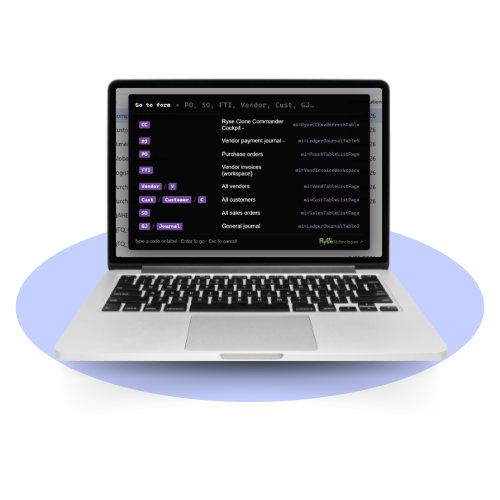
Ryse Dmnemonic is a Chrome extension for Microsoft Dynamics 365 Finance & Operations that lets users navigate D365 forms, fields, and buttons with keyboard shortcuts instead of relying on the mouse.
Ryse Dmnemonic helps users work faster by letting them assign short mnemonic codes to frequently used D365 forms and by numbering visible fields and buttons so users can jump directly to the item they need.
Ryse Dmnemonic uses Alt+: to open the form shortcut launcher and Alt+; to number visible fields and buttons on a D365 form. Users can then type the shortcut or number and press Enter.
Yes. Some Ryse Dmnemonic form shortcuts support quick filters. Users can type the form mnemonic, enter a period to see available filters, add a colon after the filter name, and enter the criteria so Dmnemonic opens the form with the filter already applied.
Ryse Dmnemonic is useful for D365 Finance & Operations users who prefer keyboard navigation, process repetitive transactions, or are transitioning from legacy systems where hotkeys and keyboard-first workflows were common.
Yes. Ryse Dmnemonic can be installed from the Chrome Web Store, but users need a valid Ryse license key to activate the extension inside D365 Finance & Operations.

Ryse Technologies, LLC
867 Boylston Street, 5th Floor #1019
Boston, MA 02116
